

When you run a multi-location spa chain, the decision between cloud-based salon software and an on-premise server setup is not just technical—it directly impacts daily operations, uptime, and customer experience. Many owners assume a local server guarantees control, but honestly, that assumption often leads to expensive failures when a branch in another city has to shut down booking for hours just because of a single hardware crash. The choice depends on how many locations you manage and what your team can realistically support—and who’s actually going to fix things when they break.
What Cloud-Based and On-Premise Systems Actually Mean for Your Spa
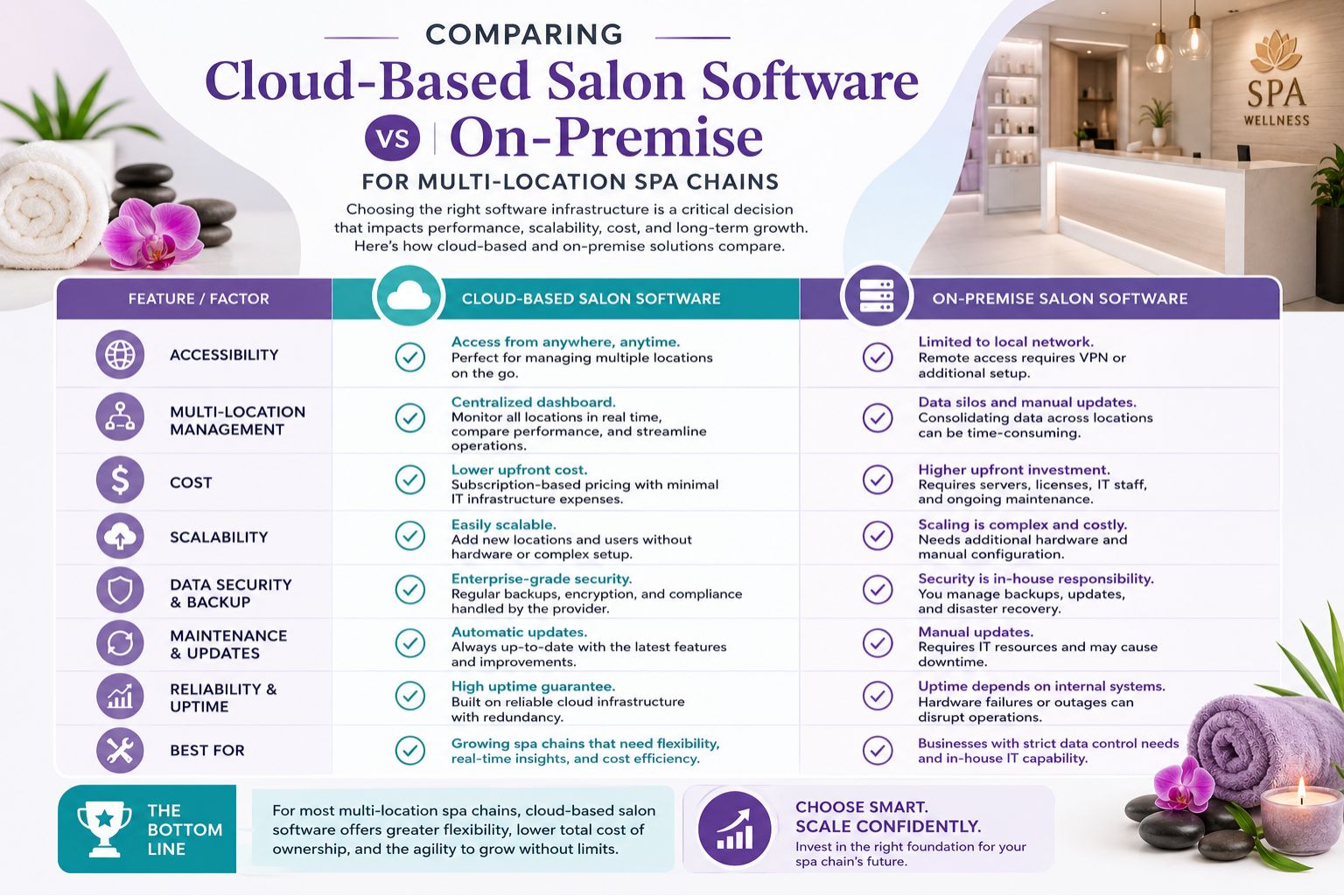
Cloud-based salon software stores all your data on remote servers accessed via the internet, so every location sees the same client history, inventory, and staff schedules in real time. On-premise systems keep everything on a local server inside one of your branches, which means data is confined to that building unless you set up complicated VPNs that nobody wants to troubleshoot. A real observation from a Delhi chain with five outlets: the cloud provider handled automatic backups daily, while the on-premise user forgot to back up after a power surge and lost three weeks of appointments—nobody even noticed until a client complained about a double booking.
Reality Check: How Each System Performs Across Indian Spa Networks
In India, where internet reliability varies wildly between cities, many franchise owners believe on-premise is safer because it does not depend on connectivity. But the reality is different—most multi-location spa chains in metros like Mumbai and Bangalore benefit from cloud software because staff can check in from any branch without waiting for sync, which honestly saves so much frustration. The non-obvious detail people overlook is that on-premise software becomes unstable when you add more than three locations; the server load increases unevenly, causing slow access during peak evening hours at your busiest outlet, and then your best receptionist is stuck staring at a loading screen.
Common Mistake: Overlooking Administrative Overhead and Recovery Time
The biggest mistake spa chains make is assuming on-premise systems are cheaper long-term. You save on monthly subscription fees, but the hidden cost comes from hiring IT staff to manage server maintenance at each branch or dealing with downtime when a hard drive fails—and let’s be real, good IT people aren’t cheap in India either. One common misunderstanding causing dissatisfaction is that owners think they own the data fully with on-premise, but in reality, disaster recovery is far slower—a server crash in one city can take 48 hours to restore, whereas cloud providers often restore within minutes from a different data center. The boundary where on-premise stops working is typically once you cross four locations; manual updates and inconsistent backups become unmanageable, and someone always forgets to run the backup script after a late shift.
Decision Help: How to Choose Based on Your Chain Size and Growth Plans
For a spa chain with two to three locations within the same city, an on-premise system can work if you have dedicated IT support and a strict backup protocol—but be honest with yourself about whether you’ll actually stick to that protocol. But if you plan to expand beyond three outlets or operate across different cities, cloud-based salon software is the only scalable path because it centralizes reporting, inventory, and marketing automation without making you pull your hair out. A timing constraint to consider: if you are preparing for a festive season like Diwali or wedding season, switching platforms mid-quarter can disrupt bookings, so plan the migration during slower months like June or July. Many owners rely on resources like salon management guides on Parlourtime to map out their transition timeline. The service dependency is simple: cloud works best for 4+ locations, on-premise suits stable single-branch setups, but honestly, even at two locations I’d lean cloud these days.
FAQ
q: Which is more secure for client data, cloud or on-premise?
a: Cloud providers typically have dedicated security teams and encrypted storage, while on-premise security depends entirely on your staff's discipline and hardware quality. A breach in a small local server can go unnoticed for days—one Bangalore spa didn’t even know their database was leaked until a competitor called them about it.
q: What happens when the internet goes down with cloud software?
a: Most cloud systems have offline modes that still allow check-ins and basic booking, which sync automatically when connection returns. On-premise systems fail completely if the network is down unless you have a redundant backup line, which nobody actually sets up because it costs extra.
q: Can I switch from on-premise to cloud without losing past data?
a: Yes, but migration requires exporting data in a compatible format, which sometimes needs manual cleaning—expect some messy Excel files in the process. Plan for at least one week of overlap to verify all client histories are transferred correctly, and keep your old server running just in case.
q: Which option is cheaper over five years for a five-location chain?
a: Cloud software has predictable monthly costs, while on-premise adds hardware upgrades, IT staff, and emergency repairs that often exceed cloud fees within three years. Many chains find cloud 30% cheaper over five years, though that number depends on how often your staff accidentally breaks things.