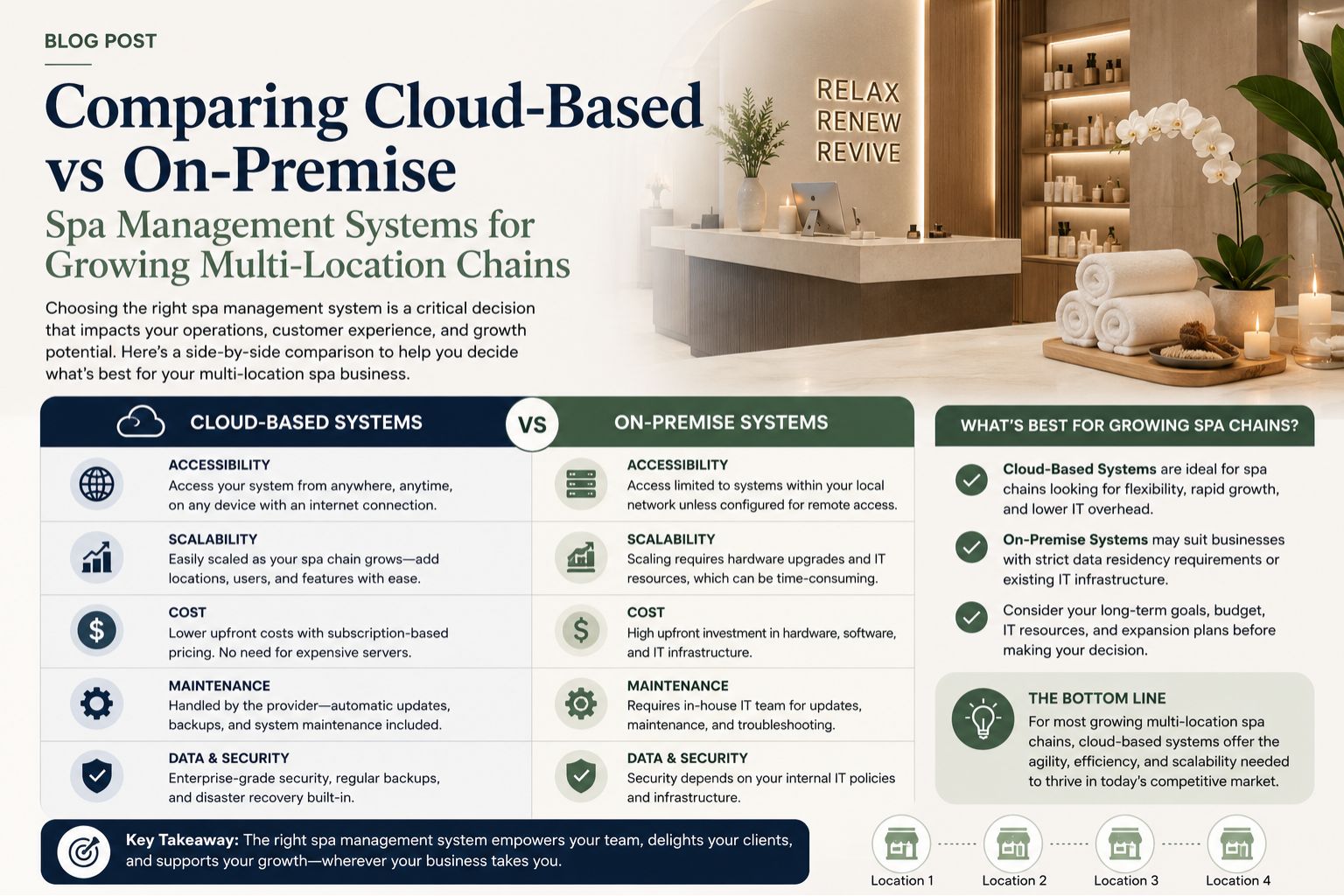


Choosing between cloud-based and on-premise spa management systems is a high-stakes decision for expanding multi-location chains, as the wrong choice leads to data silos, high maintenance costs, or system downtime that disrupts daily operations across all branches — and honestly, once you're managing three or more locations, small software problems become big ones fast.
What This Choice Means for Your Daily Operations
In real spa chains, the software dictates how receptionists book appointments, how managers track inventory, and how owners view revenue reports; I have seen teams struggle when their on-premise server at a flagship location goes down, forcing staff to revert to paper logs and manual payment processing, which delays client check-ins by 15 to 20 minutes during peak hours — and during wedding season, that delay makes customers walk out entirely.
Reality of Running Software Across Multiple Indian Locations
For growing chains in India, internet reliability varies drastically between metro cities and tier-2 towns, meaning a fully cloud-based system might fail at a location where broadband connectivity drops for two hours each afternoon, while an on-premise system requires dedicated IT support staff at every branch, which most small chains cannot afford; this often leads to inconsistent data entry and billing errors that accumulate over months, and by the time you notice, your end-of-month reports are completely off.
Common Mistake That Causes Unnecessary Overhead Costs
The biggest blind spot spa owners overlook is hidden vendor lock-in; many cloud providers charge per user per location, which seems affordable at three branches but becomes unmanageable at ten, while on-premise systems often require expensive annual maintenance contracts that still charge separately for critical updates or bug fixes, leaving chains stuck with outdated features or surprise expenses — and nobody plans for that mid-year invoice that eats into your renovation budget.
How to Decide Based on Your Growth Timeline and Budget
If you plan to open two new locations within the next 12 months, cloud-based systems offer faster deployment since you avoid hardware procurement delays, but if you already own servers and IT staff, on-premise systems provide complete data control, which matters for chains handling sensitive client medical records; you can read more about system selection for beauty chains here, and contact our team for a personalized comparison based on your specific location setup — because honestly, what works for a five-location chain in Mumbai might break for a three-location chain in Lucknow.
FAQ
q: Which system handles peak season booking surges better for multiple locations?
a: Cloud-based systems auto-scale server capacity during high traffic, while on-premise systems slow down or crash if your local server is underpowered, which happened frequently during wedding season at a Delhi chain we observed — and the receptionist had no backup plan when the system froze mid-session.
q: What are the hidden security risks of storing client data on local servers?
a: On-premise systems require regular security patches and encrypted backups; many spas neglect this, leading to data loss from hard drive failures or ransomware attacks, whereas cloud providers manage security updates centrally — but that also means you're trusting someone else with your client list.
q: How does staff training effort compare between cloud and on-premise systems?
a: Cloud systems typically have intuitive interfaces with lower training curves because updates are rolled out incrementally, but on-premise systems often require lengthy onboarding sessions each time a new version is installed manually — and trust me, getting ten receptionists to sit through a two-hour training a second time is near impossible.
q: Can I switch from on-premise to cloud later without losing historical records?
a: Yes, but data migration is complex and costly because field structures and reporting formats differ between systems; parlourtime offers migration support for chains transitioning their booking and client history to a unified platform, though you should expect some manual cleanup of duplicate records during the process.