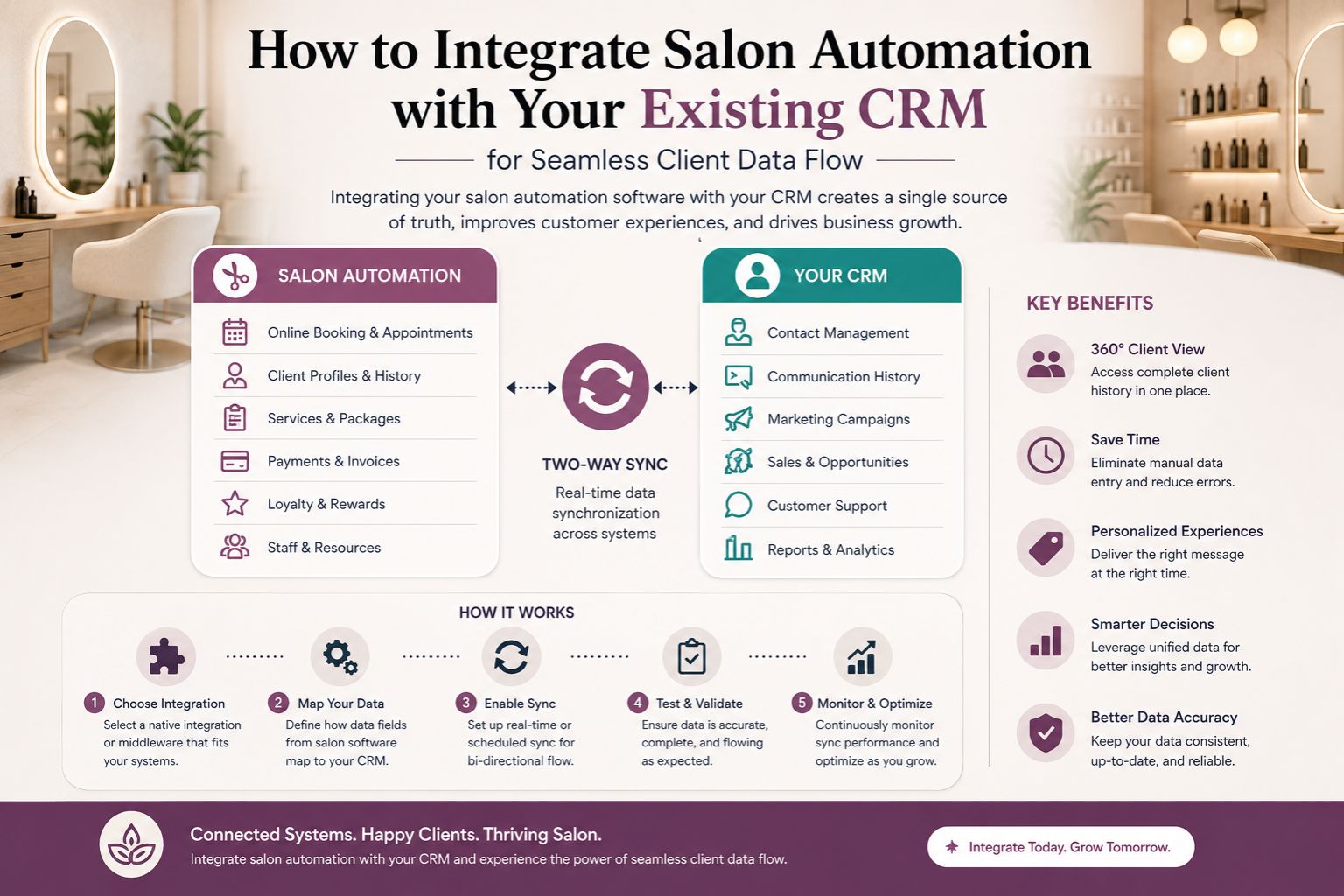


Integrating salon automation with your existing CRM is not just about plugging two systems together—it’s about ensuring every client interaction, from booking to follow-up, syncs without data silos. Many salon owners in India face the frustration of double-entry, lost appointment histories, or missed reminders because automation tools and CRMs don’t talk to each other. The real challenge often starts when a bridal client books a crown facial package, but the CRM doesn’t reflect her loyalty points or past skin sensitivity notes from earlier treatments and honestly, that's when you realise your system is broken. For parlour owners managing growing clientele, especially during wedding seasons, a data sync gap means losing potential repeat visits. This integration directly impacts how you track client preferences, avoid booking conflicts, and deliver personalized service at scale, but only if you actually set it up right from the beginning.
What a Data Sync Gap Means for Your Daily Salon Operations
A data sync gap occurs when salon automation software—like online booking or automated reminders—doesn’t automatically update your CRM. Imagine a client confirming a hair smoothening appointment through WhatsApp automation, but her visit history, product purchases, and patch test results remain stuck in the CRM from months ago, like a time capsule nobody asked for. During the actual salon visit, the stylist sees no warning about her previous reaction to a protein treatment, leading to a repeat irritation episode that could have been avoided with a simple sync. This is more common than people think: in many Indian salons, therapists rely on memory or paper logs, because the automation tool captures appointment data while the CRM stores treatment records separately, and nobody tells them to talk to each other. The missed detail? Clients often assume you remember their allergy history from last time, and when you don’t, trust erodes quickly, sometimes lost forever. One clear boundary here is that integration doesn’t mean automatic historical merge—your CRM must be configured to accept and categorize incoming data from automation systems without duplicating entries, which is harder than it sounds when you've got inconsistent naming in your service list.
What Actually Happens When Automation and CRM Run in Silos
When your automation system runs independently from your CRM, the immediate impact is on client follow-up accuracy, but it's deeper than just sending wrong messages. For instance, after a bridal skincare package, automation sends a generic “how was your service” message, but the CRM still holds her preference for quiet appointment slots and her budget cap, so the communication feels robotic and disconnected. The follow-up doesn’t reflect her real experience, so she receives irrelevant offers for hair colouring when she only wants facials, and she starts ignoring everything from your salon. In Indian salons, particularly during event seasons like Diwali or wedding months, this mismatch leads to clients ignoring messages entirely, thinking you've outsourced care to a bot that doesn't know them. The overlooked detail is timing: automation often triggers messages immediately after service, but the CRM may not update the “last visit” timestamp until the end of day, causing double messaging or missed rebooking windows that slip away forever. Services like scalp treatments or keratin smoothing require specific aftercare reminders, but without sync, reminders become generic and lose personalization, making clients feel like just another number in your system.
Common Misunderstanding That Spoils Your Client Flow
The biggest mistake salon owners make is assuming that connecting automation to CRM is a plug-and-play process managed solely by software support, as if magic will happen overnight. In reality, the mapping of fields—like treatment name, staff assignment, product upsell tags—requires upfront manual effort and a lot of patience with spreadsheets. A common error is linking only appointment statuses without also syncing client notes, service duration preferences, and product consumption, leaving huge gaps in client profiles. For example, your CRM might record that a client purchased a hair mask, but automation keeps sending her offers for the same mask she already bought, making her feel unlistened-to and undervalued. Another widespread misunderstanding is that integration solves data capture automatically; it doesn’t, and you'll still find missing pieces. If your automation tool doesn’t log specific service details—like whether a keratin treatment was partial or full—those gaps remain in the CRM, causing confusion during the next booking when the stylist has no idea what was actually done. The service boundary often appears when clients change contact numbers or request multiple services in one visit; without sync, partial data gets overwritten or lost entirely, and you're left guessing what they wanted the fifth time they come in.
How to Decide the Right Integration Timing and Priority
To integrate salon automation with your CRM effectively, start by evaluating when you have the lowest booking volume—usually mid-week or off-season, when you can afford a few hiccups in your workflow. This minimizes disruption during testing, because nobody wants to experiment on a busy Saturday with fifteen brides waiting. Prioritize syncing client identity data (name, phone, email) first, then proceed to service history and product purchase data, one step at a time. For Indian salons managing walk-ins and pre-bookings, ensure that automation does not overwrite CRM notes unless manually confirmed, or you'll lose valuable insights from previous visits. A practical approach is to run a one-week parallel test: keep both systems active and compare client records daily for discrepancies, which is tedious but necessary. Many parlour owners find that automated email confirmations often land in spam; integrating a WhatsApp-based flow instead improves delivery and client trust. The decision boundary is clear: if your CRM has more than 500 client records, invest in middleware that maps fields before linking, otherwise you'll face chaos with duplicate profiles. Parlourtime offers structured client management solutions that align with this integration workflow, helping you avoid the common pitfalls of data fragmentation that keep owners up at night. For further guidance on managing salon operations, visit Parlourtime blogs or explore frequently asked questions about software synchronization, but don't expect one-size-fits-all answers because every salon is different.
FAQ
q What does salon automation integration with CRM actually do?
a It synchronizes appointment bookings, client notes, product purchases, and reminders so you never have to re-enter data manually, improving accuracy and saving time, but only if you map everything correctly from the start.
q Will integration cause data loss or duplicate client profiles?
a If fields are not mapped correctly, duplicates can occur and you'll end up with three entries for the same Meera Sharma who keeps getting confused messages. Always test with a small data sample first, and use deduplication rules in your CRM to merge profiles automatically before going live.
q How long does it take to integrate salon automation with an existing CRM?
a For a mid-sized salon with under 1000 clients, basic integration takes one to three days of configuration and testing, but add another day if your staff needs training on the new workflow. Complex setups with custom fields may require up to a week, and you'll probably discover issues you didn't anticipate on day four.
q Can I integrate WhatsApp-based booking automation with my CRM?
a Yes, many modern automation tools support WhatsApp API integration, but ensure your CRM can accept incoming message histories and update client timelines in real-time, otherwise the conversation history won't show up when the client walks in next time and asks about that discount you promised.