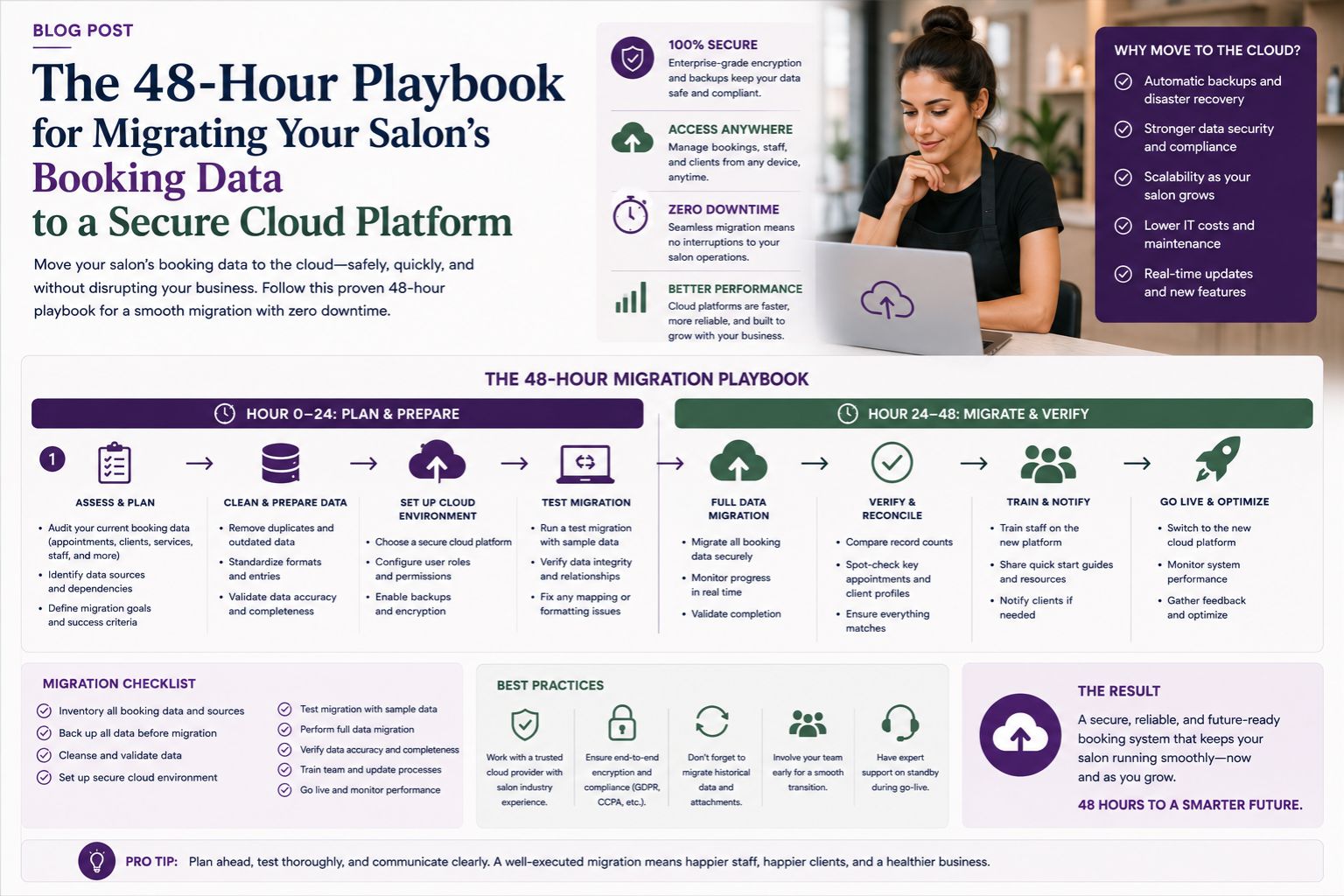


Migrating your salon's booking data to a secure cloud platform within 48 hours often triggers intense data migration anxiety, especially when you've spent years building customer records and appointment histories. Many salon owners in Mumbai and Delhi rush this process during festive seasons like Diwali or wedding months, fearing downtime will lose them bridal bookings. The real panic sets in when you realize your local system holds thousands of past transactions, client skin sensitivity notes, and service preferences that cannot afford to vanish—or at least that's what keeps me up at night thinking about it.
What This Data Migration Concern Actually Means for Your Salon Workflow
When we talk about migrating to a secure cloud, most salon owners think it is just copying files, but the actual challenge lies in mapping your booking data fields like appointment time slots, staff assignments, and client hair treatment histories into a new system without breaking your daily operations. A common observation from salons in Pune is that they forget their local software stored client notes about allergic reactions to specific products, and those notes get lost during the migration if not explicitly exported. The non-obvious detail here is that your booking data often contains nested information like service dependencies—for example, a keratin treatment requires a follow-up booking exactly three months later, which may not transfer correctly—and honestly, who even thinks about that until it's too late?
Reality Check: What Actually Happens to Indian Salon Data During Cloud Migration
The harsh reality for Indian salons is that a direct cutover within 48 hours often leads to patchy results where some customer booking histories appear duplicated while others disappear entirely, causing immediate confusion during the next rush hour. Many salon owners overlook the fact that their existing data structure collects client skin care routines and last-minute cancellations differently than cloud platforms expect, leading to mapping errors. A real boundary where this process stops working is when your local system stores service prices as text with currency symbols like ₹1200, while the cloud platform expects numeric values, causing the entire import to fail silently—I've heard stories about this happening and the frustration is just...
Common Mistake: Wrong Assumptions About Your Booking Data That Destroy Confidence
The biggest mistake salon owners make is assuming that booking data migration is purely technical, ignoring that your staff's booking patterns and time-off schedules are deeply tied to your local system's logic. One common misunderstanding causing dissatisfaction is thinking that moving to the cloud will solve all your salon booking challenges overnight, but in reality, if your staff is not trained on the new interface within those 48 hours, they will double-book appointments manually and cause more chaos. Another blind spot is neglecting to clean your data before migration—duplicate client profiles for regular walk-ins named "Priya" or "Sharma" multiply during transfer and corrupt your salon booking system, and trust me, every salon in India has at least three "Priyas" with different phone numbers.
Decision Help: How to Strategically Time and Execute Your Salon Data Migration
The smartest decision you can make is to migrate your booking data on a Monday or Tuesday when your salon has fewer appointment loads, giving you and your staff a full 48-hour weekend window to test the new secure cloud platform without losing bridal prep clients. You must first export a test batch of your last three months of service history to verify field mapping before committing your entire database, and this is where parlourtime's approach to structured data handling offers a clear framework for salon owners. The key boundary to recognize is that if your salon uses custom booking fields like "bridal trial notes" or "hair damage repair references," you will need manual intervention because automated tools often miss these unstructured entries—and I'm just being honest about what's realistic here.
FAQ
q Will I lose my regular client booking history if I migrate to a cloud platform?
a You will not lose all data if you perform a full backup of your local system before migration, but history older than three years often gets dropped because of format incompatibility between your salon software and the cloud system.
q How do I know if my booking data will get corrupted during the 48-hour migration?
a Data corruption usually happens when your local system stores appointment notes with special characters like "facial (with extra steam)" that the cloud platform cannot parse, so always run a test import first to spot these errors.
q Can I still take walk-in bookings while migrating my data to a secure cloud platform?
a You can take walk-in bookings only if you keep your old system running in parallel during the first 24 hours of the 48-hour window, because a complete shutdown of appointment scheduling risks losing revenue on peak days like weekends.
q What if my salon staff refuses to use the new cloud booking system after migration?
a Staff resistance often stems from fear of change and lack of training; you must involve at least one senior staff member in the migration process beforehand so they can explain the benefits of secure cloud storage for client skin sensitivity records and billing accuracy.