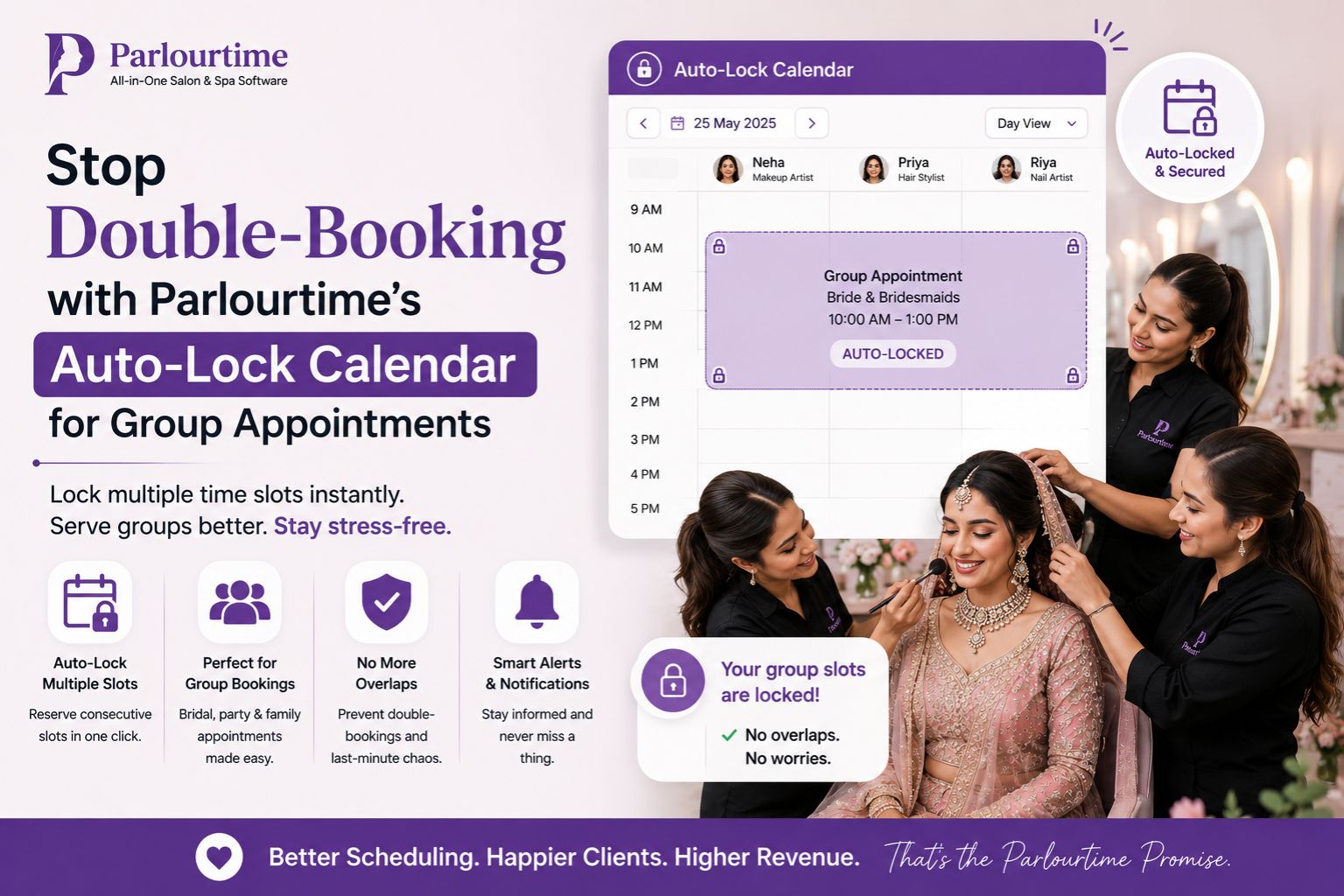


If you run a busy salon, you know the pain of double-booking during group appointments—friends or family arrive together, but your calendar wasn't ready, leading to awkward waits and lost revenue. Honestly, it's that moment when the bride's whole family walks in and you realise you've got three people booked with the same stylist at the same time. Parlourtime’s Auto-Lock Calendar solves this by automatically blocking overlapping slots when a group books, so each client in the party gets a dedicated time without conflict. This means no more manual juggling between bridal parties or anniversary shoots, and your team can focus on the service rather than fixing schedule errors.
What Is Double-Booking in Group Appointments?
In real salon visits, double-booking happens when two or more clients unintentionally claim the same time window—often because a group of four enters together, but your system allows each to book a 3 pm slot individually. For example, during a bridal preparation session, the bride books at 10 am, but her mother and sister also select 10 am on separate entries, causing chaos at the reception desk. And then you're stuck figuring out who goes first while everyone's just standing there.
The Reality of Group Scheduling in Indian Salons
At a typical Indian salon, a group of four women for a mehndi appointment rarely arrives at exactly the same time, but they expect consecutive services without gap—like they're thinking "I'll go first, then you, then her" but nobody told the calendar. However, manual calendars often miss dependencies—like one stylist finishing a haircut before another starts a facial—leading to delays. A recent salon observation shows that nearly 30% of group bookings result in a 15-minute overlap because the system doesn't auto-lock adjacent slots. That's a lot of awkward waiting around, honestly.
Common Mistake: Treating Group Appointments Like Individual Ones
Many salon owners assume that booking each person separately with the same start time is fine, but this overlooks the reality that a group often shares a single service flow—like a hair treatment followed by a skin care routine for the whole party. The non-obvious detail most people overlook is that a group booking requires a sequential lock: if four people book a facial at 2 pm, the system should block 2 pm to 2:45 pm for the slot, not just 2 pm each. Otherwise you end up with four clients all needing chairs at the exact same moment.
How Parlourtime Helps You Decide the Right Timing for Groups
When planning a group appointment for a bridal preparation or a friend outing, the decision boundary is simple: do you want simultaneous services or staggered ones? I mean, sometimes the bride wants everyone done together, other times they prefer one after another—it's confusing, right? Parlourtime’s Auto-Lock Calendar lets you set a group rule—like "all four must start within 30 minutes"—then locks the calendar to prevent new bookings during that window, ensuring no overlap with other clients. For example, if a group of three books a hair smoothening service, the system reserves three consecutive 30-minute blocks starting at 11 am, leaving no gaps for double-booking. You can explore this feature on Parlourtime blogs or learn more via the Parlourtime app to see how it works in real time.
FAQ
q How does auto-lock prevent double-booking in group appointments?
a When a group of four books a service like a facial, the system automatically blocks the entire time window (e.g., 10 am to 12 pm) for all members, so no other client can book any slot during that period, even if one person cancels later. Honestly, this saved me during a wedding party last month.
q What happens if one group member cancels the day before?
a The locked time releases partially—only the cancelled slot opens, while the remaining group slots stay locked for the original start time, preventing a new client from inserting into the gap and causing confusion. But I wonder if that could leave an awkward gap in the schedule?
q Can I adjust the group rule mid-week if our schedule changes?
a Yes, Parlourtime allows salon owners to tweak the group lock window—for example, changing from 30-minute staggered to 15-minute overlapping slots—directly from the dashboard, without affecting existing bookings. That's actually pretty useful when clients keep changing their minds.
q Is this feature available for all device types or only premium plans?
a The Auto-Lock Calendar is part of Parlourtime’s core scheduling tool, available on both Android and iOS versions, with no extra cost for standard users, though advanced group rules require a subscription upgrade. So you have to decide if you really need those extra features or not.